


10 Best Routers for AT&T Fiber in 2026

If you are searching for a router that works with AT&T Fiber and gives you a strong wireless connection for all your devices, this list is a good place to start.
Below are ten routers that are sold in 2026 and suit AT&T Fiber plans, from budget Wi-Fi 6 models for the entry plans to Wi-Fi 7 routers with 10 Gbps ports for the fastest tiers.
Updated September 2026: product availability, specs and prices re-checked.
Before You Buy: How Your Own Router Works With AT&T Fiber
AT&T Fiber plans now run from 300 Mbps up to 5 Gig, with the same speed for downloads and uploads. AT&T says the 5 Gig plan tops out at about 4.7 Gbps for a single wired device, and that speeds above 1 Gbps need at least a Cat6 cable and an Ethernet port rated for multi-gig speeds.
You can’t replace AT&T’s gateway. It connects to the fiber line and handles sign-in to AT&T’s network, so it stays in place. To use your own router, connect it to the gateway with an Ethernet cable and turn on IP Passthrough in the gateway’s settings, so your router handles your home network. Most people also turn off the gateway’s own Wi-Fi to avoid two networks competing. AT&T’s newer Wi-Fi 7 gateway, the BGW620, has two 10G Ethernet ports, so it can pass multi-gig speeds to a capable router.
That makes the router’s internet (WAN) port the key spec:
- Plans up to 1 Gig: a router with a Gigabit WAN port is enough.
- 2 Gig plan: look for a 2.5 Gbps (or faster) WAN port.
- 5 Gig plan: look for a 5 Gbps or 10 Gbps WAN port, and a 10 Gbps port for your fastest wired computer.
One more change since this list was first written: AT&T stopped selling new DSL connections in October 2020. DSL modem-routers, such as the Netgear DGND3700 that used to appear on this list, don’t work on a fiber line at all.
1. NETGEAR Nighthawk AX12 (RAX120)
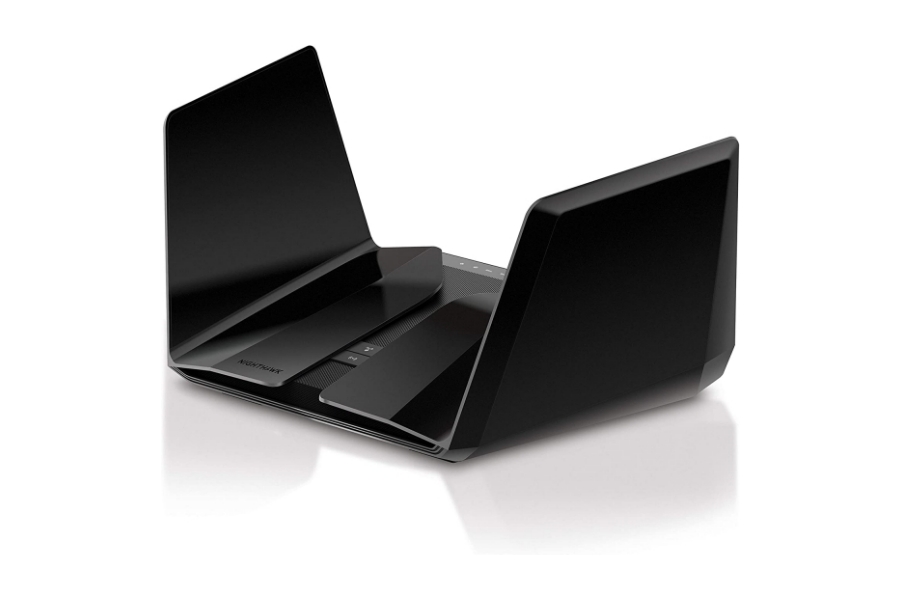
The NETGEAR Nighthawk AX12 is still sold in 2026, now as the RAX120v2. It is a dual-band Wi-Fi 6 router rated AX6000, meaning up to 1.2 Gbps on 2.4 GHz and 4.8 Gbps on 5 GHz, or about 6 Gbps combined.
It runs on a 64-bit quad-core 2.2 GHz processor and uses eight concealed antennas. The standout for AT&T Fiber is its configurable 5G/2.5G/1G multi-gig Ethernet port, which suits the 2 Gig plan. It also has five Gigabit Ethernet ports and two USB 3.0 ports. NETGEAR lists it at $449.99 (September 2026).
Pros of NETGEAR Nighthawk AX12
- 5 Gbps multi-gig port
- Strong quad-core processor
- Eight antennas for large homes
- Two USB 3.0 ports
Cons of NETGEAR Nighthawk AX12
- Wi-Fi 6, not Wi-Fi 7, at a Wi-Fi 7 price
- No 6 GHz band
2. Linksys Velop Pro 7
The Linksys EA9300 from the original list is no longer on Linksys’s site. The company now focuses on mesh systems, and the Linksys Velop Pro 7 is its Wi-Fi 7 flagship. It is a true tri-band system with 320 MHz channels and 4K QAM, and Linksys rates each node for up to 3,000 square feet.
Each node has a 2.5 Gbps internet port, which fits the AT&T 2 Gig plan, plus four Gigabit ports. It supports Multi-Link Operation and both wired and wireless backhaul, so you can add nodes as your home requires. Linksys also promises automatic firmware updates and free safe-browsing protection.
Pros of Linksys Velop Pro 7
- Wi-Fi 7 tri-band mesh
- 2.5 Gbps internet port
- Up to 3,000 sq. ft. per node
- Wired or wireless backhaul
Cons of Linksys Velop Pro 7
- LAN ports are only Gigabit
- No 5 or 10 Gbps port for the 5 Gig plan
3. ASUS ROG Rapture GT-AX11000
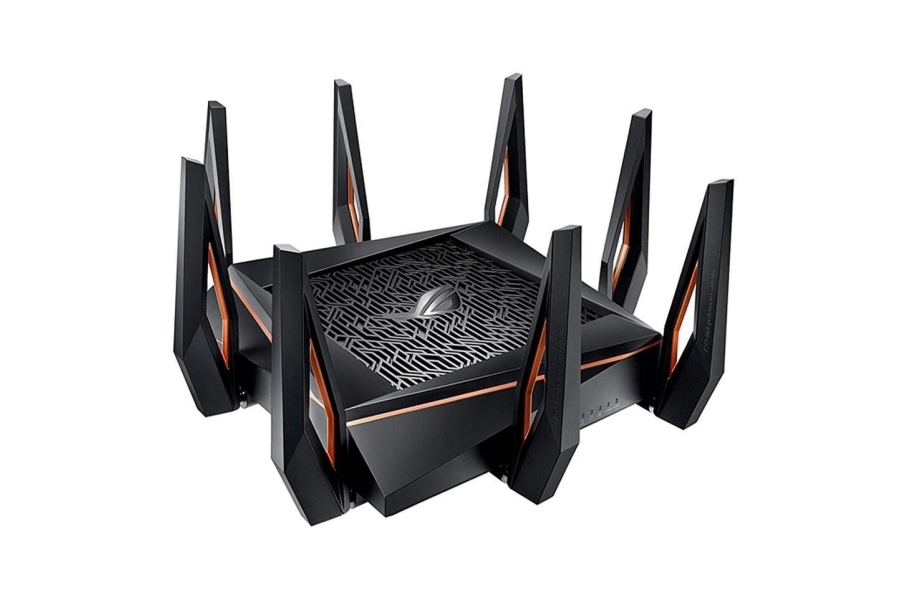
The ASUS ROG Rapture GT-AX11000 is still listed by ASUS. It is a tri-band Wi-Fi 6 gaming router (one 2.4 GHz and two 5 GHz bands) rated AX11000, with a 1.8 GHz quad-core CPU.
Its 2.5G WAN/LAN port handles the AT&T 2 Gig plan. Gamers get Adaptive QoS and game acceleration, VPN Fusion, RGB lighting and AiMesh support if you later want to add ASUS mesh nodes.
Pros of ASUS ROG Rapture GT-AX11000
- Built for gaming, with Adaptive QoS and game acceleration
- Tri-band Wi-Fi 6
- 2.5G WAN/LAN port
- AiMesh support
- RGB lights
Cons of ASUS ROG Rapture GT-AX11000
- Older Wi-Fi 6 design without a 6 GHz band
- Large footprint with eight antennas
4. TP-Link Archer A20 (AC4000)
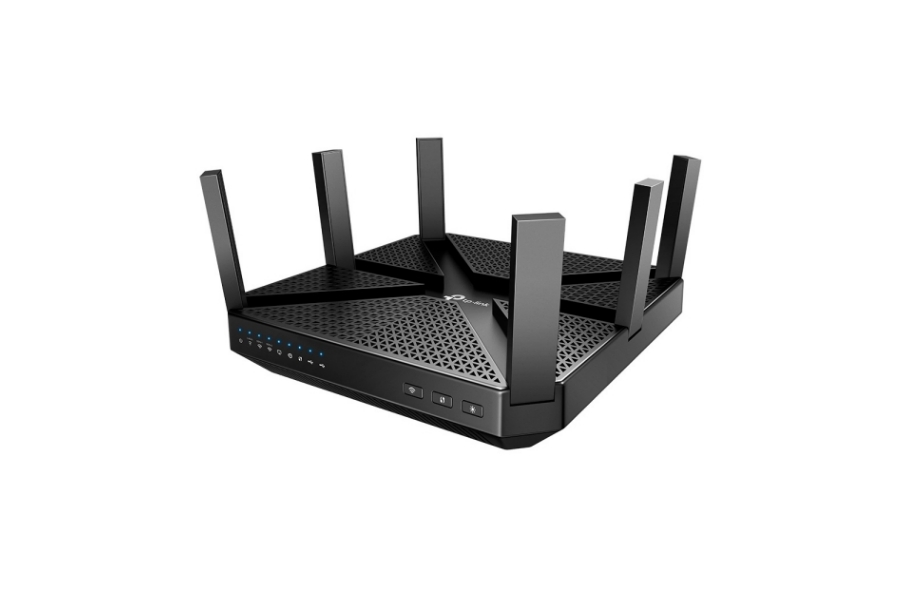
The TP-Link Archer A20 is still on TP-Link’s site in its V3 version. It is a tri-band Wi-Fi 5 router rated AC4000: two 5 GHz bands at 1625 Mbps each and a 2.4 GHz band at 750 Mbps, powered by a 1.8 GHz 64-bit CPU.
Six antennas with Beamforming and RangeBoost spread the signal, and it has one Gigabit WAN port, four Gigabit LAN ports, link aggregation, and USB 3.0 and 2.0 ports. HomeCare antivirus and parental controls, a VPN server and Alexa support are included. With a Gigabit WAN port, it is best matched to AT&T plans up to 1 Gig.
Pros of TP-Link Archer A20
- Tri-band coverage
- Six antennas
- Built-in antivirus and parental controls
- Compatible with Alexa
Cons of TP-Link Archer A20
- Wi-Fi 5 only
- Gigabit WAN port limits it to 1 Gig plans
5. NETGEAR Nighthawk RS300
The Nighthawk RS400 from the original list is gone from NETGEAR’s site. Its place in the Nighthawk range is taken by the NETGEAR Nighthawk RS300, a tri-band Wi-Fi 7 router rated BE9300 (up to 9.3 Gbps) with 2.4 GHz, 5 GHz and 6 GHz bands.
It has a 2.5 Gbps internet port, two 2.5 Gbps LAN ports and two Gigabit LAN ports, plus a USB 3.0 port. NETGEAR rates it for up to 2,500 square feet and 100 devices, and it can run separate networks for main devices, smart home gadgets and guests. NETGEAR lists it at $299.99 (September 2026).
Pros of NETGEAR Nighthawk RS300
- Wi-Fi 7 with a 6 GHz band
- 2.5 Gbps internet port and two 2.5 Gbps LAN ports
- Separate IoT and guest networks
- Automatic firmware updates
Cons of NETGEAR Nighthawk RS300
- NETGEAR Armor security is an optional paid subscription
- Not fast enough at the port level for the 5 Gig plan
6. TP-Link Archer AX55
TP-Link now marks the Archer A7 as end of life, so the budget slot goes to the TP-Link Archer AX55. It is a dual-band Wi-Fi 6 router rated at 2402 Mbps on 5 GHz and 574 Mbps on 2.4 GHz.
It has four high-gain external antennas with Beamforming, one Gigabit WAN port, four Gigabit LAN ports and a USB 3.0 port. HomeShield adds security and parental controls, it supports OneMesh and EasyMesh for adding extenders, and it works with Alexa. It is a sensible, low-cost match for AT&T plans up to 1 Gig.
Pros of TP-Link Archer AX55
- Wi-Fi 6 at a budget price
- Four Gigabit LAN ports
- HomeShield parental controls
- Mesh support with OneMesh and EasyMesh
Cons of TP-Link Archer AX55
- Gigabit WAN port only
- No 6 GHz band
7. ASUS RT-BE88U
If you have AT&T’s 5 Gig plan, you need a router with ports that can keep up. The ASUS RT-BE88U is a dual-band Wi-Fi 7 router rated up to 7,200 Mbps, and its port list is its main strength: one 10G SFP+ port, one 10G WAN/LAN Ethernet port, four 2.5G WAN/LAN ports and four Gigabit LAN ports.
It uses a quad-core 2.6 GHz CPU and four detachable antennas, and ASUS enlarged the aluminum cooling plate over the previous model. AiProtection Pro security from Trend Micro, WireGuard VPN support and AiMesh are included.
Pros of ASUS RT-BE88U
- 10G Ethernet and 10G SFP+ ports for the 5 Gig plan
- Ten wired ports in total
- Built-in security and VPN features
- AiMesh support
Cons of ASUS RT-BE88U
- Dual-band only, no 6 GHz band
- More ports and settings than a typical home needs
8. NETGEAR Nighthawk RS100
The Motorola MR2600 from the original list could not be confirmed as still sold, so this budget slot goes to the NETGEAR Nighthawk RS100, NETGEAR’s entry-level Wi-Fi 7 router. It is dual-band (2.4 GHz and 5 GHz) and rated BE3600, up to 3.6 Gbps.
It has a 2.5 Gbps internet port, four Gigabit LAN ports and a quad-core 2.0 GHz processor. NETGEAR rates it for up to 2,000 square feet and 50 devices, and it includes guest Wi-Fi and VPN support. NETGEAR lists it at $149.99 (September 2026).
Pros of NETGEAR Nighthawk RS100
- Low-cost Wi-Fi 7
- 2.5 Gbps internet port
- Compact design
- Four Gigabit LAN ports
Cons of NETGEAR Nighthawk RS100
- No 6 GHz band
- Rated for smaller homes and fewer devices
9. TP-Link Archer BE550
The NETGEAR Nighthawk AX4 (RAX40) in the original list has been overtaken by Wi-Fi 7 routers at similar prices. A good example is the TP-Link Archer BE550, a tri-band Wi-Fi 7 router rated BE9300, with 5760 Mbps on 6 GHz, 2880 Mbps on 5 GHz and 574 Mbps on 2.4 GHz.
Every Ethernet port is multi-gig: one 2.5 Gbps WAN port and four 2.5 Gbps LAN ports, plus a USB 3.0 port. It supports 320 MHz channels, Multi-Link Operation and EasyMesh, and includes HomeShield security and a private IoT network option.
Pros of TP-Link Archer BE550
- Tri-band Wi-Fi 7 with 320 MHz channels
- Five 2.5 Gbps Ethernet ports
- VPN client and server
- Private IoT network
Cons of TP-Link Archer BE550
- No 10 Gbps port for the 5 Gig plan
- Internal antennas cannot be repositioned
10. TP-Link Archer C5400X (AC5400)
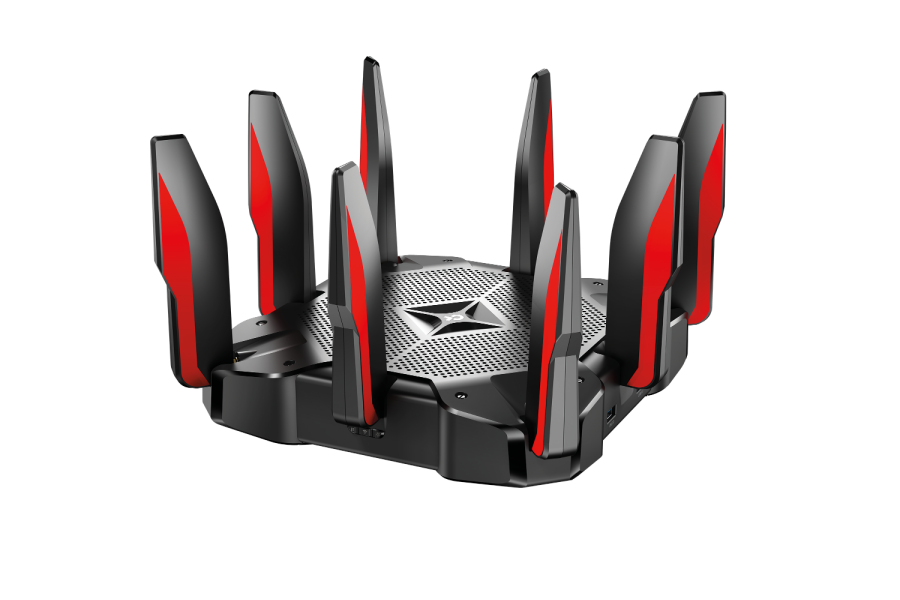
The TP-Link Archer C5400X is still on TP-Link’s site. This tri-band Wi-Fi 5 gaming router has a 1.8 GHz 64-bit quad-core CPU, three co-processors and 1 GB of RAM, with two 5 GHz bands at 2167 Mbps each and a 2.4 GHz band at 1000 Mbps.
It stands out for wired connections: eight Gigabit LAN ports, two of which can be combined with link aggregation, plus two USB 3.0 ports. It also has a Game Accelerator, MU-MIMO and Airtime Fairness, HomeCare antivirus, and a built-in VPN server (OpenVPN and PPTP).
Pros of TP-Link Archer C5400X
- Eight Gigabit LAN ports
- Built-in VPN server
- Gaming features and 1 GB of RAM
Cons of TP-Link Archer C5400X
- Wi-Fi 5 only
- Gigabit WAN port limits it to 1 Gig plans
Related reading
Conclusion
For most AT&T Fiber plans up to 1 Gig, a budget router such as the TP-Link Archer AX55 or NETGEAR Nighthawk RS100 is enough. On the 2 Gig plan, pick a router with a 2.5 Gbps or faster internet port, such as the NETGEAR RS300, TP-Link Archer BE550 or Linksys Velop Pro 7 for larger homes. On the 5 Gig plan, only a router with a 10 Gbps port, like the ASUS RT-BE88U, lets you use most of that speed. Whichever you choose, keep AT&T’s gateway connected and set it to IP Passthrough.
Featured image: windowscentral.com